# Як знайти направлення?

<span style="font-size: 12pt; font-family: 'Times New Roman',serif; color: #000000; background-color: transparent; font-weight: 400; font-style: normal; font-variant: normal; text-decoration: none; vertical-align: baseline; white-space: pre-wrap;">Направлення можна знайти 3 способами: </span>

### <span style="color: rgb(0, 0, 0);"><span style="font-size: 12pt; font-family: 'Times New Roman', serif; background-color: transparent; font-weight: bold; font-style: normal; font-variant: normal; text-decoration: none; vertical-align: baseline; white-space: pre-wrap;">В ЕМК пацієнта на вкладці “Епізоди”.</span><span style="font-size: 12pt; font-family: 'Times New Roman', serif; background-color: transparent; font-weight: 400; font-style: normal; font-variant: normal; text-decoration: none; vertical-align: baseline; white-space: pre-wrap;"> </span></span>

<span style="color: rgb(0, 0, 0);"><span style="font-size: 12pt; font-family: 'Times New Roman', serif; background-color: transparent; font-weight: 400; font-style: normal; font-variant: normal; text-decoration: none; vertical-align: baseline; white-space: pre-wrap;">Найбільш зручний спосіб, якщо Ви створювали епізод в ІС СЗХ.</span><span style="font-size: 12pt; font-family: 'Times New Roman', serif; background-color: transparent; font-weight: 400; font-style: normal; font-variant: normal; text-decoration: none; vertical-align: baseline; white-space: pre-wrap;">  
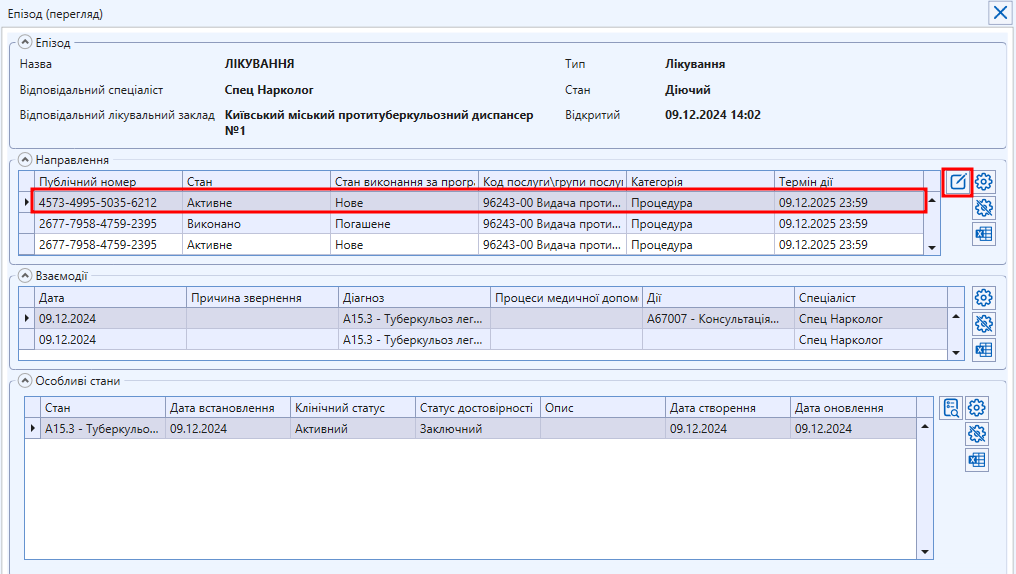
</span><span style="background-color: transparent; font-family: 'Times New Roman', serif; font-size: 12pt; font-style: normal; font-variant-ligatures: normal; font-variant-caps: normal; font-weight: 400; text-wrap: wrap;">З ЕМК пацієнта перейти на вкладку епізоди та знайти свій епізод (по назві чи заповненому полю “Остання дія в системі”. Натиснути кнопку “Редагувати”  
</span></span>

[![image.png](https://knowledge.phc.org.ua/uploads/images/gallery/2024-12/scaled-1680-/pbWimage.png)](https://knowledge.phc.org.ua/uploads/images/gallery/2024-12/pbWimage.png)

<span style="color: rgb(0, 0, 0);">**<span style="font-size: 12pt; font-family: 'Times New Roman', serif; background-color: transparent; font-weight: 400; font-style: normal; font-variant: normal; text-decoration: none; vertical-align: baseline; white-space: pre-wrap;">В картці епізода в частині “Направлення” є перелік всіх направлень, створених за цим епізодом. Потрібне направлення можна знайти за полем “Код послуги/групи послуг”. Щоб відкрити картку направлення, необхідно натиснути на нього, а потім на кнопку “Редагувати”.  
  
</span>**</span>[![image.png](https://knowledge.phc.org.ua/uploads/images/gallery/2024-12/scaled-1680-/AnIimage.png)](https://knowledge.phc.org.ua/uploads/images/gallery/2024-12/AnIimage.png)

<span style="color: rgb(0, 0, 0);"><span style="font-size: 12pt; font-family: 'Times New Roman', serif; background-color: transparent; font-weight: bold; font-style: normal; font-variant: normal; text-decoration: none; vertical-align: baseline; white-space: pre-wrap;">В реєстрі “Направлення пацієнта” по ПІБ пацієнта</span><span style="font-size: 12pt; font-family: 'Times New Roman', serif; background-color: transparent; font-weight: 400; font-style: normal; font-variant: normal; text-decoration: none; vertical-align: baseline; white-space: pre-wrap;">.   
  
</span></span>

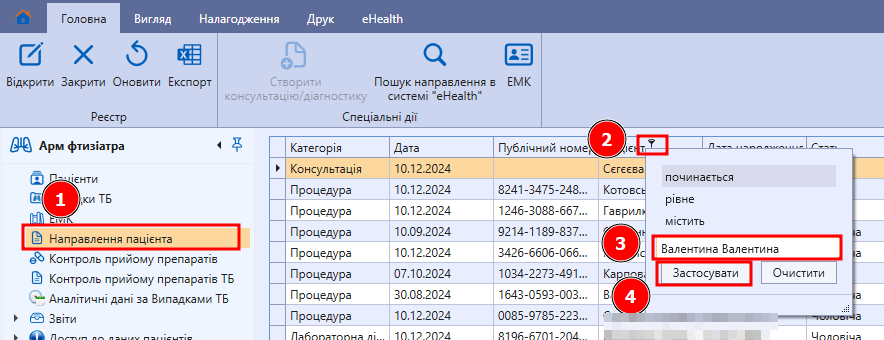
<span style="font-size: 12pt; font-family: 'Times New Roman',serif; color: #000000; background-color: transparent; font-weight: 400; font-style: normal; font-variant: normal; text-decoration: none; vertical-align: baseline; white-space: pre-wrap;"><span style="font-size: 12pt; font-family: 'Times New Roman', serif; background-color: transparent; font-weight: 400; font-style: normal; font-variant: normal; text-decoration: none; vertical-align: baseline; white-space: pre-wrap;">Перейти в реєстр "Направлення пацієнта", натиснути на фільтр, заповнити ПІБ пацієнта, натиснути “Застосувати”   
  
</span></span>![image.png](https://knowledge.phc.org.ua/uploads/images/gallery/2024-12/scaled-1680-/cmHimage.png)

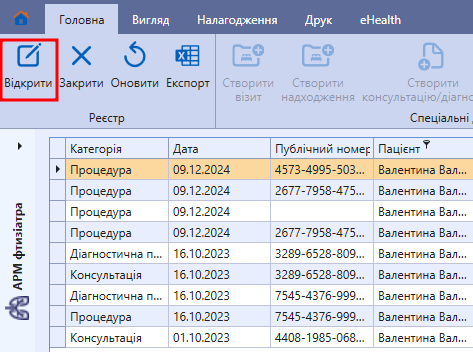
<span style="font-size: 12pt; font-family: 'Times New Roman',serif; color: #000000; background-color: transparent; font-weight: 400; font-style: normal; font-variant: normal; text-decoration: none; vertical-align: baseline; white-space: pre-wrap;"><span style="font-size: 12pt; font-family: 'Times New Roman', serif; background-color: transparent; font-weight: 400; font-style: normal; font-variant: normal; text-decoration: none; vertical-align: baseline; white-space: pre-wrap;">Буде відображено перелік всіх направлень цього пацієнта. Необхідне направлення можна відкрити двічі натиснувши лівою кнопкою миші або через кнопку “Відкрити” </span></span>

[![image.png](https://knowledge.phc.org.ua/uploads/images/gallery/2024-12/scaled-1680-/RS2image.png)](https://knowledge.phc.org.ua/uploads/images/gallery/2024-12/RS2image.png)

### <span style="color: rgb(0, 0, 0);">**<span style="font-size: 12pt; font-family: 'Times New Roman', serif; background-color: transparent; font-style: normal; font-variant: normal; text-decoration: none; vertical-align: baseline; white-space: pre-wrap;">В ЕМК пацієнта </span><span style="font-size: 12pt; font-family: 'Times New Roman', serif; background-color: transparent; font-style: normal; font-variant: normal; text-decoration: none; vertical-align: baseline; white-space: pre-wrap;">в пункті “</span><span style="font-size: 12pt; font-family: 'Times New Roman', serif; background-color: transparent; font-style: normal; font-variant: normal; text-decoration: none; vertical-align: baseline; white-space: pre-wrap;">Направлення пацієнта eHealth</span><span style="font-size: 12pt; font-family: 'Times New Roman', serif; background-color: transparent; font-style: normal; font-variant: normal; text-decoration: none; vertical-align: baseline; white-space: pre-wrap;"> в “</span><span style="font-size: 12pt; font-family: 'Times New Roman', serif; background-color: transparent; font-style: normal; font-variant: normal; text-decoration: none; vertical-align: baseline; white-space: pre-wrap;">Консультація (ehealth)”</span>**</span>

<span style="color: rgb(0, 0, 0);"><span style="font-size: 12pt; font-family: 'Times New Roman', serif; background-color: transparent; font-weight: 400; font-style: normal; font-variant: normal; text-decoration: none; vertical-align: baseline; white-space: pre-wrap;">Даний спосіб буде зручним, якщо направлення були створені в останній консультації.  
  
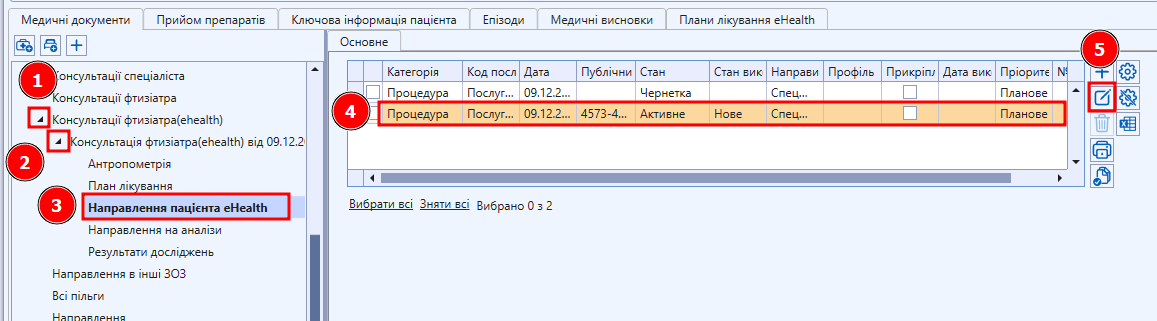
</span><span style="font-size: 12pt; font-family: 'Times New Roman', serif; background-color: transparent; font-weight: 400; font-style: normal; font-variant: normal; text-decoration: none; vertical-align: baseline; white-space: pre-wrap;">В ЕМК знайти “Консультації (ehealth)”, відкрити пункти, відкрити пункти консультації, натиснути на “Направлення пацієнта eHealth”, обрати необхідне направленні і натиснути "Редагувати"</span></span>

[![image.png](https://knowledge.phc.org.ua/uploads/images/gallery/2024-12/scaled-1680-/axgimage.png)](https://knowledge.phc.org.ua/uploads/images/gallery/2024-12/axgimage.png)