# Не вдається завершити призначення

[  
![image.png](https://knowledge.phc.org.ua/uploads/images/gallery/2024-12/scaled-1680-/RL8image.png)](https://knowledge.phc.org.ua/uploads/images/gallery/2024-12/RL8image.png)

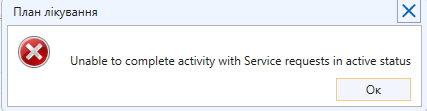
> <span style="font-size: 12pt; font-family: 'Times New Roman',serif; color: #000000; background-color: transparent; font-weight: 400; font-style: normal; font-variant: normal; text-decoration: none; vertical-align: baseline; white-space: pre-wrap;">Якщо призначення неможливо завершити або відмінити, то це означає, що існують направлення зі статусом Активне і Нове/В черзі/В обробці. </span>

**<span style="font-size: 12pt; font-family: 'Times New Roman', serif; color: rgb(0, 0, 0); background-color: transparent; font-style: normal; font-variant: normal; text-decoration: none; vertical-align: baseline; white-space: pre-wrap;">1. Перевірка чи всі направлення погашені під консультаціями</span>**

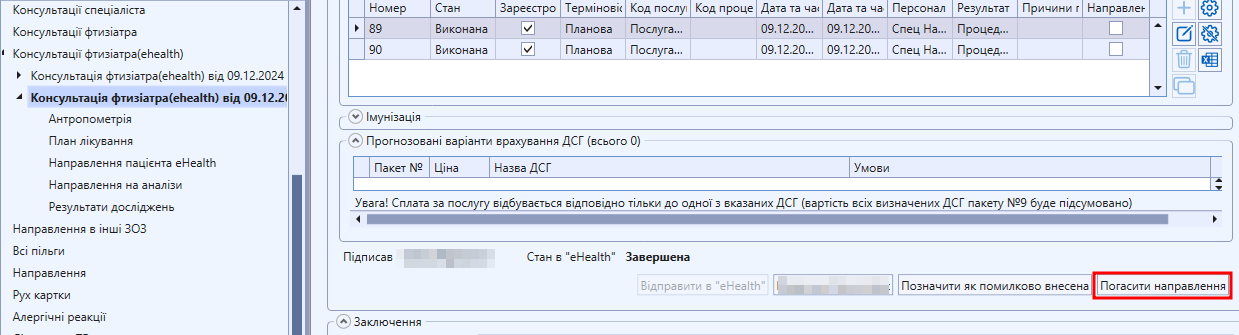
<span style="font-size: 12pt; font-family: 'Times New Roman',serif; color: #000000; background-color: transparent; font-weight: 400; font-style: normal; font-variant: normal; text-decoration: none; vertical-align: baseline; white-space: pre-wrap;">Для перевірки стану направлення, необхідно відкрити амбулаторну картку пацієнта, обрати пункт Консультації (ehealth), перевірити чи є в загальному списку є консультація зі станом направлення “В обробці”   
  
</span>

[![image.png](https://knowledge.phc.org.ua/uploads/images/gallery/2024-12/scaled-1680-/JjAimage.png)](https://knowledge.phc.org.ua/uploads/images/gallery/2024-12/JjAimage.png)

<span style="font-size: 12pt; font-family: 'Times New Roman',serif; color: #000000; background-color: transparent; font-weight: 400; font-style: normal; font-variant: normal; text-decoration: none; vertical-align: baseline; white-space: pre-wrap;">Якщо така взаємодія існує, то її необхідно відкрити і погасити направлення</span>

[![image.png](https://knowledge.phc.org.ua/uploads/images/gallery/2024-12/scaled-1680-/LCSimage.png)](https://knowledge.phc.org.ua/uploads/images/gallery/2024-12/LCSimage.png)  
<span style="color: rgb(0, 0, 0);"><span style="font-size: 12pt; font-family: 'Times New Roman', serif; background-color: transparent; font-weight: 400; font-style: normal; font-variant: normal; text-decoration: none; vertical-align: baseline; white-space: pre-wrap;">  
</span><span style="font-size: 12pt; font-family: 'Times New Roman', serif; background-color: transparent; font-weight: 400; font-style: normal; font-variant: normal; text-decoration: none; vertical-align: baseline; white-space: pre-wrap;">Якщо помилка залишається, то необхідно знайти направлення в статусі Активне і Нове/В черзі/В обробці, яке заважає завершити Призначення (див. наступний пункт).</span></span>

<span style="color: rgb(0, 0, 0);"><span style="font-size: 12pt; font-family: 'Times New Roman', serif; background-color: transparent; font-weight: 400; font-style: normal; font-variant: normal; text-decoration: none; vertical-align: baseline; white-space: pre-wrap;">**<span style="font-size: 12pt; font-family: 'Times New Roman', serif; color: rgb(0, 0, 0); background-color: transparent; font-style: normal; font-variant: normal; text-decoration: none; vertical-align: baseline; white-space: pre-wrap;">2. Дії з активними направленнями  
</span>**</span></span><span style="color: rgb(0, 0, 0);">  
<span style="font-size: 12pt; font-family: 'Times New Roman', serif; background-color: transparent; font-weight: 400; font-style: normal; font-variant: normal; text-decoration: none; vertical-align: baseline; white-space: pre-wrap;">Як знайти направлення читайте за </span><span style="text-decoration: underline;"><span style="color: rgb(35, 111, 161); text-decoration: underline;">[<span style="font-size: 12pt; font-family: 'Times New Roman', serif; background-color: transparent; font-weight: 400; font-style: normal; font-variant: normal; vertical-align: baseline; white-space: pre-wrap;">посиланням</span>](https://knowledge.phc.org.ua/books/populyarni-pitannya-shhodo-esoz/page/yak-znaiti-napravlennya)</span><span style="font-size: 12pt; font-family: 'Times New Roman', serif; background-color: transparent; font-weight: 400; font-style: normal; font-variant: normal; vertical-align: baseline; white-space: pre-wrap;"><span style="color: rgb(35, 111, 161); text-decoration: underline;">.  
</span>  
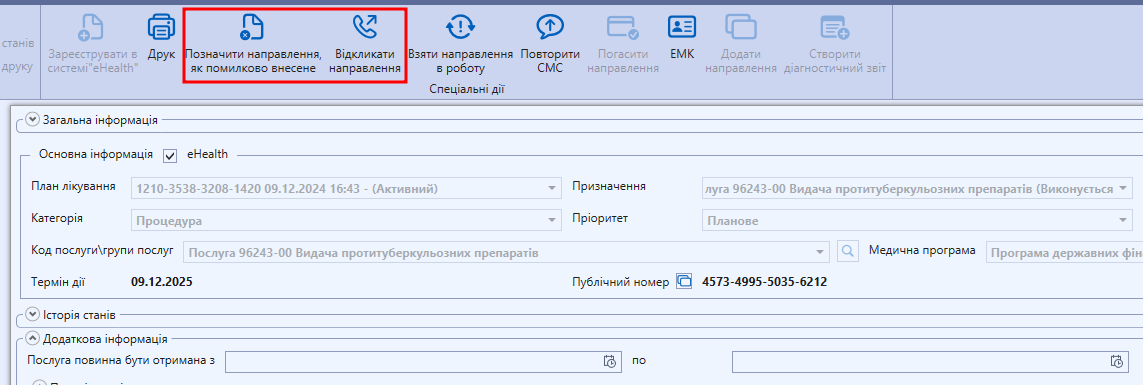
</span></span><span style="font-size: 12pt; font-family: 'Times New Roman', serif; background-color: transparent; font-weight: 400; font-style: normal; font-variant: normal; text-decoration: none; vertical-align: baseline; white-space: pre-wrap;">Відкрийте направлення та натисніть кнопку “Відкликати направлення” або “Позначити направлення, як помилково внесене”. </span></span>

<span style="font-size: 12pt; font-family: 'Times New Roman',serif; color: #000000; background-color: transparent; font-weight: 400; font-style: normal; font-variant: normal; text-decoration: none; vertical-align: baseline; white-space: pre-wrap;">Підпишіть КЕПом і натисніть “Зберегти” і “Закрити”.  
</span>

[![image.png](https://knowledge.phc.org.ua/uploads/images/gallery/2024-12/scaled-1680-/7ZYimage.png)](https://knowledge.phc.org.ua/uploads/images/gallery/2024-12/7ZYimage.png)

<span style="font-size: 12pt; font-family: 'Times New Roman',serif; color: #000000; background-color: transparent; font-weight: 400; font-style: normal; font-variant: normal; text-decoration: none; vertical-align: baseline; white-space: pre-wrap;">Якщо існує декілька направлень, які заважають завершити призначення, то ці дії необхідно повторити з усіма направленнями, які були створені за даним призначенням.</span>