# Популярні питання щодо ЕСОЗ

# Помилка “Не знайдено взаємодію у пацієнта”

<span style="font-size: 11pt; font-family: Arial,sans-serif; color: #000000; background-color: transparent; font-weight: 400; font-style: normal; font-variant: normal; text-decoration: none; vertical-align: baseline; white-space: pre-wrap;">Дана помилка виникає, якщо відсутній зв’язок між взаємодією та карткою в нашій системі. Це можливо в 2 випадках. </span>

[![image.png](https://knowledge.phc.org.ua/uploads/images/gallery/2024-12/scaled-1680-/2RVimage.png)](https://knowledge.phc.org.ua/uploads/images/gallery/2024-12/2RVimage.png)

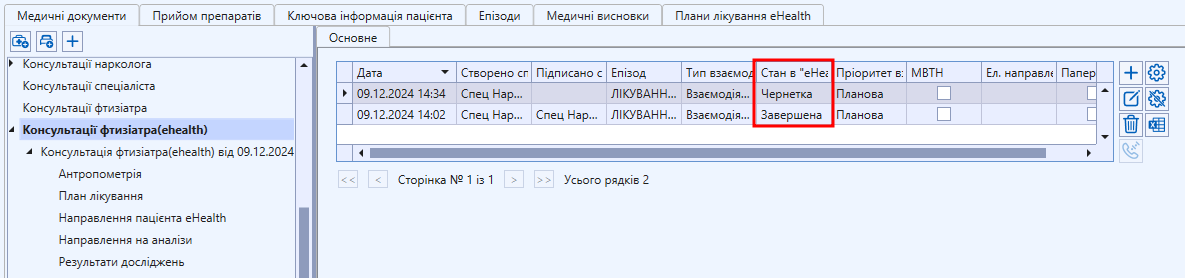
<span style="font-size: 11pt; font-family: Arial,sans-serif; color: #000000; background-color: transparent; font-weight: bold; font-style: italic; font-variant: normal; text-decoration: none; vertical-align: baseline; white-space: pre-wrap;">1</span><span style="font-size: 11pt; font-family: Arial,sans-serif; color: #000000; background-color: transparent; font-weight: 400; font-style: normal; font-variant: normal; text-decoration: none; vertical-align: baseline; white-space: pre-wrap;">. </span><span style="font-size: 11pt; font-family: Arial,sans-serif; color: #000000; background-color: transparent; font-weight: bold; font-style: italic; font-variant: normal; text-decoration: none; vertical-align: baseline; white-space: pre-wrap;">Взаємодія в стані Чернетка/Невдала обробка/Помилково внесена.   
  
</span>

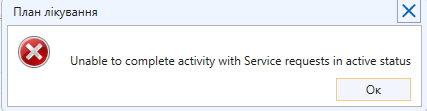
<span style="font-size: 11pt; font-family: Arial,sans-serif; color: #000000; background-color: transparent; font-weight: 400; font-style: normal; font-variant: normal; text-decoration: none; vertical-align: baseline; white-space: pre-wrap;">Створити направлення чи план лікування можна виключно тоді, коли взаємодія в стані “Завершена”. </span>

<span style="font-size: 11pt; font-family: Arial,sans-serif; color: #000000; background-color: transparent; font-weight: 400; font-style: normal; font-variant: normal; text-decoration: none; vertical-align: baseline; white-space: pre-wrap;">Для того щоб перевірити стан взаємодії необхідно відкрити консультації (ehealth).  
  
</span>

<span style="font-size: 11pt; font-family: Arial,sans-serif; color: #000000; background-color: transparent; font-weight: 400; font-style: normal; font-variant: normal; text-decoration: none; vertical-align: baseline; white-space: pre-wrap;">[![image.png](https://knowledge.phc.org.ua/uploads/images/gallery/2024-12/scaled-1680-/nInimage.png)](https://knowledge.phc.org.ua/uploads/images/gallery/2024-12/nInimage.png)</span>

<span style="font-size: 11pt; font-family: Arial,sans-serif; color: #000000; background-color: transparent; font-weight: 400; font-style: normal; font-variant: normal; text-decoration: none; vertical-align: baseline; white-space: pre-wrap;">  
Для вирішення проблеми необхідно натиснути на консультацію в стані “Завершена”, відкрити її та створити нове направлення або в плані лікування обрати консультацію в стані "Завершена" (найпростіше зорієнтуватися по даті та часу взаємодії, оскільки при створення плану стан взаємодії не відображається).</span>

<span style="font-size: 11pt; font-family: Arial,sans-serif; color: #000000; background-color: transparent; font-weight: bold; font-style: italic; font-variant: normal; text-decoration: none; vertical-align: baseline; white-space: pre-wrap;">2. Попередня декларація у пацієнта вже не активна.   
  
</span>

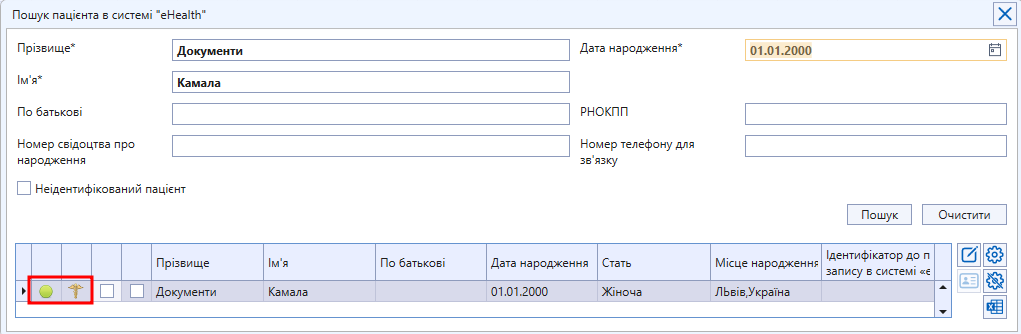
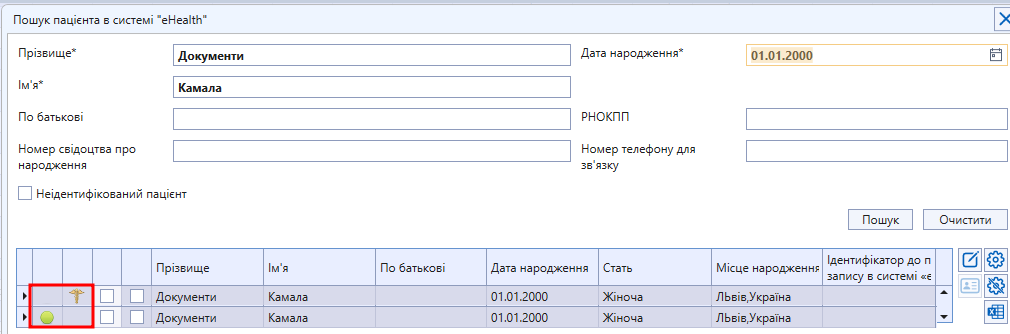
<span style="font-size: 11pt; font-family: Arial,sans-serif; color: #000000; background-color: transparent; font-weight: 400; font-style: normal; font-variant: normal; text-decoration: none; vertical-align: baseline; white-space: pre-wrap;">Будь ласка, виконайте пошук пацієнта в ЕСОЗ і переконайтеся в відсутності під'єднаної декларації (якщо знайдена картка має лише таку позначку </span>![](https://lh7-us.googleusercontent.com/soEhHOAb5bfs-oXgovDljOrf3kj_17nG084VJllt4OVgPmvIr8EV8ikEg6AAKuD6GcoALhtT7uGmRg4V9tELiZvdV1sSP5zvLk8IGlTVj9xesZNAjX1QMDzuMqX53CwLXaADcjPGkPCsOtGDlp8Txho), <span style="font-style: normal; font-variant: normal; font-weight: 400; text-indent: 36pt; background-color: transparent; font-size: 11pt; font-family: Arial, sans-serif; color: rgb(0, 0, 0); white-space-collapse: preserve;">то картки не об'єднані, якщо має обидві позначки </span>![](https://lh7-us.googleusercontent.com/fcB6m1nmprxFNFb0-2gYpPGcjPxNy29jpoM3UihteWgs0BdCVmy0d3iQZ-OKYiYwujx1Al2HsPFQKRN4YSGqOaDzEtWnLXlX4iYukRFDS-eeqsndn47-BVfti6-AubzGgPYuQeBJnf7s__IyWeaK0z0)<span style="font-style: normal; font-variant: normal; font-weight: 400; text-indent: 36pt; background-color: transparent; font-size: 11pt; font-family: Arial, sans-serif; color: rgb(0, 0, 0); white-space-collapse: preserve;"> </span><span style="font-style: normal; font-variant: normal; font-weight: 400; text-indent: 36pt; background-color: transparent; font-size: 11pt; font-family: Arial, sans-serif; color: rgb(0, 0, 0); white-space-collapse: preserve;">, то з декларацією все добре)   
  
**<span style="color: rgb(45, 194, 107);">Вигляд, коли картки об'єднані:</span>**  
  
</span>

[![image.png](https://knowledge.phc.org.ua/uploads/images/gallery/2024-12/scaled-1680-/zaOimage.png)](https://knowledge.phc.org.ua/uploads/images/gallery/2024-12/zaOimage.png)

<span style="color: rgb(224, 62, 45);">**<span style="font-style: normal; font-variant: normal; text-indent: 36pt; background-color: transparent; font-size: 11pt; font-family: Arial, sans-serif; white-space-collapse: preserve;">Вигляд, коли картки не об'єднані:</span>**</span>

**[![image.png](https://knowledge.phc.org.ua/uploads/images/gallery/2024-12/scaled-1680-/fZjimage.png)](https://knowledge.phc.org.ua/uploads/images/gallery/2024-12/fZjimage.png)**

<span style="font-size: 11pt; font-family: Arial,sans-serif; color: #000000; background-color: transparent; font-weight: 400; font-style: normal; font-variant: normal; text-decoration: none; vertical-align: baseline; white-space: pre-wrap;">**<span style="color: rgb(224, 62, 45);">Якщо картки не об'єднані, але колись були, то спочатку переконайтесь, що пацієнт живий!</span>**  
  
Якщо у пацієнта все добре, але картки роз'єднані, то необхідно звернутись до служби техпідтримки, назвати індивідуальний номер та ПІБ пацієнта, щоб остаточно роз’єднати картку.</span>

> <span style="font-size: 11pt; font-family: Arial, sans-serif; color: rgb(45, 194, 107); background-color: transparent; font-weight: bold; font-style: normal; font-variant: normal; text-decoration: none; vertical-align: baseline; white-space: pre-wrap;">Після роз’єднання</span><span style="font-size: 11pt; font-family: Arial,sans-serif; color: #000000; background-color: transparent; font-weight: 400; font-style: normal; font-variant: normal; text-decoration: none; vertical-align: baseline; white-space: pre-wrap;"> картки технічною підтримкою необхідно:   
>   
> </span>
> 
> <span style="font-size: 11pt; font-family: Arial,sans-serif; color: #000000; background-color: transparent; font-weight: bold; font-style: normal; font-variant: normal; text-decoration: none; vertical-align: baseline; white-space: pre-wrap;">1</span><span style="font-size: 11pt; font-family: Arial, sans-serif; color: rgb(0, 0, 0); background-color: transparent; font-style: normal; font-variant: normal; text-decoration: none; vertical-align: baseline; white-space: pre-wrap;">.</span><span style="font-size: 11pt; font-family: Arial,sans-serif; color: #000000; background-color: transparent; font-weight: bold; font-style: normal; font-variant: normal; text-decoration: none; vertical-align: baseline; white-space: pre-wrap;"> перезайти </span><span style="font-size: 11pt; font-family: Arial,sans-serif; color: #000000; background-color: transparent; font-weight: 400; font-style: normal; font-variant: normal; text-decoration: none; vertical-align: baseline; white-space: pre-wrap;">в систему (закрити повністю застосунок і відкрити знову)   
> </span><span style="font-size: 11pt; font-family: Arial,sans-serif; color: #000000; background-color: transparent; font-weight: 400; font-style: normal; font-variant: normal; text-decoration: none; vertical-align: baseline; white-space: pre-wrap;">**2**. з’єднати пацієнта з </span><span style="font-size: 11pt; font-family: Arial,sans-serif; color: #000000; background-color: transparent; font-weight: bold; font-style: normal; font-variant: normal; text-decoration: none; vertical-align: baseline; white-space: pre-wrap;">новою </span><span style="font-size: 11pt; font-family: Arial,sans-serif; color: #000000; background-color: transparent; font-weight: 400; font-style: normal; font-variant: normal; text-decoration: none; vertical-align: baseline; white-space: pre-wrap;">декларацією   
> </span><span style="font-style: normal; font-variant: normal; font-weight: 400; background-color: transparent; font-size: 11pt; font-family: Arial, sans-serif;">**3**. працювати з пацієнтом як з </span><span style="font-style: normal; font-variant: normal; background-color: transparent; font-size: 11pt; font-family: Arial, sans-serif; font-weight: bold;">первинним </span><span style="font-style: normal; font-variant: normal; font-weight: 400; background-color: transparent; font-size: 11pt; font-family: Arial, sans-serif;">(необхідно створити: епізод, консультацію, план лікування, призначення, направлення та консультацію з направленням)</span>

# Помилка “Person is not active”

[![image.png](https://knowledge.phc.org.ua/uploads/images/gallery/2023-10/scaled-1680-/o7Rimage.png)](https://knowledge.phc.org.ua/uploads/images/gallery/2023-10/o7Rimage.png)

<span style="font-size: 11pt; font-family: Arial,sans-serif; color: #000000; background-color: transparent; font-weight: 400; font-style: normal; font-variant: normal; text-decoration: none; vertical-align: baseline; white-space: pre-wrap;"> При виникненні помилки “Person is not active” необхідно перевірити декларацію пацієнта. </span>

<span style="font-size: 11pt; font-family: Arial,sans-serif; color: #000000; background-color: transparent; font-weight: 400; font-style: normal; font-variant: normal; text-decoration: none; vertical-align: baseline; white-space: pre-wrap;">Будь ласка, виконайте пошук пацієнта в ЕСОЗ і переконайтеся в відсутності під'єднаної декларації (якщо знайдена картка має лише таку позначку </span>![](https://lh7-us.googleusercontent.com/soEhHOAb5bfs-oXgovDljOrf3kj_17nG084VJllt4OVgPmvIr8EV8ikEg6AAKuD6GcoALhtT7uGmRg4V9tELiZvdV1sSP5zvLk8IGlTVj9xesZNAjX1QMDzuMqX53CwLXaADcjPGkPCsOtGDlp8Txho), <span style="font-style: normal; font-variant: normal; font-weight: 400; text-indent: 36pt; background-color: transparent; font-size: 11pt; font-family: Arial, sans-serif; color: rgb(0, 0, 0); white-space-collapse: preserve;">то картки не об'єднані, якщо має обидві позначки </span>![](https://lh7-us.googleusercontent.com/fcB6m1nmprxFNFb0-2gYpPGcjPxNy29jpoM3UihteWgs0BdCVmy0d3iQZ-OKYiYwujx1Al2HsPFQKRN4YSGqOaDzEtWnLXlX4iYukRFDS-eeqsndn47-BVfti6-AubzGgPYuQeBJnf7s__IyWeaK0z0)<span style="font-style: normal; font-variant: normal; font-weight: 400; text-indent: 36pt; background-color: transparent; font-size: 11pt; font-family: Arial, sans-serif; color: rgb(0, 0, 0); white-space-collapse: preserve;"> </span><span style="font-style: normal; font-variant: normal; font-weight: 400; text-indent: 36pt; background-color: transparent; font-size: 11pt; font-family: Arial, sans-serif; color: rgb(0, 0, 0); white-space-collapse: preserve;">, то з декларацією все добре)   
  
**<span style="color: rgb(45, 194, 107);">Вигляд, коли картки об'єднані:</span>**  
  
</span>

[![image.png](https://knowledge.phc.org.ua/uploads/images/gallery/2024-12/scaled-1680-/zaOimage.png)](https://knowledge.phc.org.ua/uploads/images/gallery/2024-12/zaOimage.png)

<span style="color: rgb(224, 62, 45);">**<span style="font-style: normal; font-variant: normal; text-indent: 36pt; background-color: transparent; font-size: 11pt; font-family: Arial, sans-serif; white-space-collapse: preserve;">Вигляд, коли картки не об'єднані:</span>**</span>

**[![image.png](https://knowledge.phc.org.ua/uploads/images/gallery/2024-12/scaled-1680-/fZjimage.png)](https://knowledge.phc.org.ua/uploads/images/gallery/2024-12/fZjimage.png)**

<span style="font-size: 11pt; font-family: Arial,sans-serif; color: #000000; background-color: transparent; font-weight: 400; font-style: normal; font-variant: normal; text-decoration: none; vertical-align: baseline; white-space: pre-wrap;">**<span style="color: rgb(224, 62, 45);">Якщо картки не об'єднані, але колись були, то спочатку переконайтесь, що пацієнт живий!</span>**  
  
Якщо у пацієнта все добре, але картки роз'єднані, то необхідно звернутись до служби техпідтримки, назвати індивідуальний номер та ПІБ пацієнта, щоб остаточно роз’єднати картку.</span>

> <span style="font-size: 11pt; font-family: Arial, sans-serif; color: rgb(45, 194, 107); background-color: transparent; font-weight: bold; font-style: normal; font-variant: normal; text-decoration: none; vertical-align: baseline; white-space: pre-wrap;">Після роз’єднання</span><span style="font-size: 11pt; font-family: Arial,sans-serif; color: #000000; background-color: transparent; font-weight: 400; font-style: normal; font-variant: normal; text-decoration: none; vertical-align: baseline; white-space: pre-wrap;"> картки технічною підтримкою необхідно:   
>   
> </span>
> 
> <span style="font-size: 11pt; font-family: Arial,sans-serif; color: #000000; background-color: transparent; font-weight: bold; font-style: normal; font-variant: normal; text-decoration: none; vertical-align: baseline; white-space: pre-wrap;">1</span><span style="font-size: 11pt; font-family: Arial, sans-serif; color: rgb(0, 0, 0); background-color: transparent; font-style: normal; font-variant: normal; text-decoration: none; vertical-align: baseline; white-space: pre-wrap;">.</span><span style="font-size: 11pt; font-family: Arial,sans-serif; color: #000000; background-color: transparent; font-weight: bold; font-style: normal; font-variant: normal; text-decoration: none; vertical-align: baseline; white-space: pre-wrap;"> перезайти </span><span style="font-size: 11pt; font-family: Arial,sans-serif; color: #000000; background-color: transparent; font-weight: 400; font-style: normal; font-variant: normal; text-decoration: none; vertical-align: baseline; white-space: pre-wrap;">в систему (закрити повністю застосунок і відкрити знову)   
> </span><span style="font-size: 11pt; font-family: Arial,sans-serif; color: #000000; background-color: transparent; font-weight: 400; font-style: normal; font-variant: normal; text-decoration: none; vertical-align: baseline; white-space: pre-wrap;">**2**. з’єднати пацієнта з </span><span style="font-size: 11pt; font-family: Arial,sans-serif; color: #000000; background-color: transparent; font-weight: bold; font-style: normal; font-variant: normal; text-decoration: none; vertical-align: baseline; white-space: pre-wrap;">новою </span><span style="font-size: 11pt; font-family: Arial,sans-serif; color: #000000; background-color: transparent; font-weight: 400; font-style: normal; font-variant: normal; text-decoration: none; vertical-align: baseline; white-space: pre-wrap;">декларацією   
> </span><span style="font-style: normal; font-variant: normal; font-weight: 400; background-color: transparent; font-size: 11pt; font-family: Arial, sans-serif;">**3**. працювати з пацієнтом як з </span><span style="font-style: normal; font-variant: normal; background-color: transparent; font-size: 11pt; font-family: Arial, sans-serif; font-weight: bold;">первинним </span><span style="font-style: normal; font-variant: normal; font-weight: 400; background-color: transparent; font-size: 11pt; font-family: Arial, sans-serif;">(необхідно створити: епізод, консультацію, план лікування, призначення, направлення та консультацію з направленням) </span>

# Не вдається завершити призначення

[  
![image.png](https://knowledge.phc.org.ua/uploads/images/gallery/2024-12/scaled-1680-/RL8image.png)](https://knowledge.phc.org.ua/uploads/images/gallery/2024-12/RL8image.png)

> <span style="font-size: 12pt; font-family: 'Times New Roman',serif; color: #000000; background-color: transparent; font-weight: 400; font-style: normal; font-variant: normal; text-decoration: none; vertical-align: baseline; white-space: pre-wrap;">Якщо призначення неможливо завершити або відмінити, то це означає, що існують направлення зі статусом Активне і Нове/В черзі/В обробці. </span>

**<span style="font-size: 12pt; font-family: 'Times New Roman', serif; color: rgb(0, 0, 0); background-color: transparent; font-style: normal; font-variant: normal; text-decoration: none; vertical-align: baseline; white-space: pre-wrap;">1. Перевірка чи всі направлення погашені під консультаціями</span>**

<span style="font-size: 12pt; font-family: 'Times New Roman',serif; color: #000000; background-color: transparent; font-weight: 400; font-style: normal; font-variant: normal; text-decoration: none; vertical-align: baseline; white-space: pre-wrap;">Для перевірки стану направлення, необхідно відкрити амбулаторну картку пацієнта, обрати пункт Консультації (ehealth), перевірити чи є в загальному списку є консультація зі станом направлення “В обробці”   
  
</span>

[![image.png](https://knowledge.phc.org.ua/uploads/images/gallery/2024-12/scaled-1680-/JjAimage.png)](https://knowledge.phc.org.ua/uploads/images/gallery/2024-12/JjAimage.png)

<span style="font-size: 12pt; font-family: 'Times New Roman',serif; color: #000000; background-color: transparent; font-weight: 400; font-style: normal; font-variant: normal; text-decoration: none; vertical-align: baseline; white-space: pre-wrap;">Якщо така взаємодія існує, то її необхідно відкрити і погасити направлення</span>

[![image.png](https://knowledge.phc.org.ua/uploads/images/gallery/2024-12/scaled-1680-/LCSimage.png)](https://knowledge.phc.org.ua/uploads/images/gallery/2024-12/LCSimage.png)  
<span style="color: rgb(0, 0, 0);"><span style="font-size: 12pt; font-family: 'Times New Roman', serif; background-color: transparent; font-weight: 400; font-style: normal; font-variant: normal; text-decoration: none; vertical-align: baseline; white-space: pre-wrap;">  
</span><span style="font-size: 12pt; font-family: 'Times New Roman', serif; background-color: transparent; font-weight: 400; font-style: normal; font-variant: normal; text-decoration: none; vertical-align: baseline; white-space: pre-wrap;">Якщо помилка залишається, то необхідно знайти направлення в статусі Активне і Нове/В черзі/В обробці, яке заважає завершити Призначення (див. наступний пункт).</span></span>

<span style="color: rgb(0, 0, 0);"><span style="font-size: 12pt; font-family: 'Times New Roman', serif; background-color: transparent; font-weight: 400; font-style: normal; font-variant: normal; text-decoration: none; vertical-align: baseline; white-space: pre-wrap;">**<span style="font-size: 12pt; font-family: 'Times New Roman', serif; color: rgb(0, 0, 0); background-color: transparent; font-style: normal; font-variant: normal; text-decoration: none; vertical-align: baseline; white-space: pre-wrap;">2. Дії з активними направленнями  
</span>**</span></span><span style="color: rgb(0, 0, 0);">  
<span style="font-size: 12pt; font-family: 'Times New Roman', serif; background-color: transparent; font-weight: 400; font-style: normal; font-variant: normal; text-decoration: none; vertical-align: baseline; white-space: pre-wrap;">Як знайти направлення читайте за </span><span style="text-decoration: underline;"><span style="color: rgb(35, 111, 161); text-decoration: underline;">[<span style="font-size: 12pt; font-family: 'Times New Roman', serif; background-color: transparent; font-weight: 400; font-style: normal; font-variant: normal; vertical-align: baseline; white-space: pre-wrap;">посиланням</span>](https://knowledge.phc.org.ua/books/populyarni-pitannya-shhodo-esoz/page/yak-znaiti-napravlennya)</span><span style="font-size: 12pt; font-family: 'Times New Roman', serif; background-color: transparent; font-weight: 400; font-style: normal; font-variant: normal; vertical-align: baseline; white-space: pre-wrap;"><span style="color: rgb(35, 111, 161); text-decoration: underline;">.  
</span>  
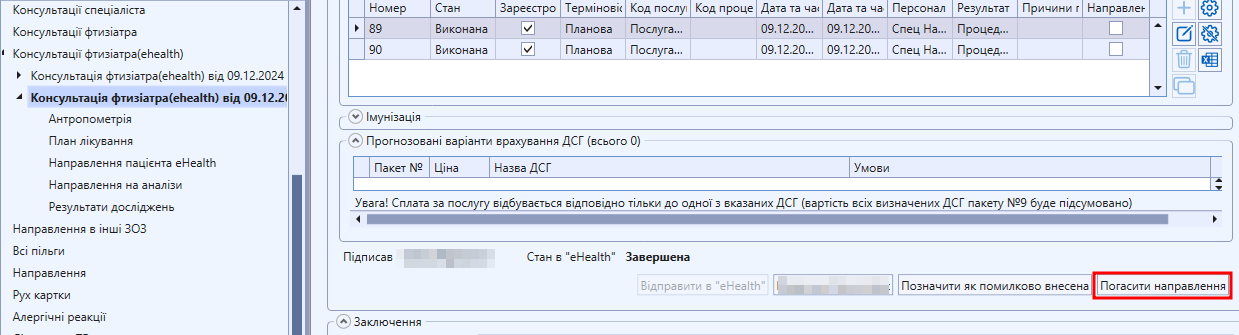
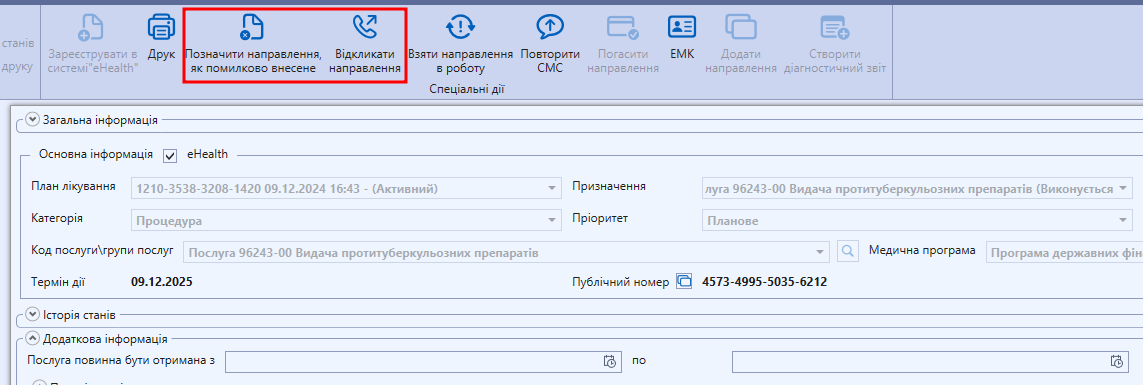
</span></span><span style="font-size: 12pt; font-family: 'Times New Roman', serif; background-color: transparent; font-weight: 400; font-style: normal; font-variant: normal; text-decoration: none; vertical-align: baseline; white-space: pre-wrap;">Відкрийте направлення та натисніть кнопку “Відкликати направлення” або “Позначити направлення, як помилково внесене”. </span></span>

<span style="font-size: 12pt; font-family: 'Times New Roman',serif; color: #000000; background-color: transparent; font-weight: 400; font-style: normal; font-variant: normal; text-decoration: none; vertical-align: baseline; white-space: pre-wrap;">Підпишіть КЕПом і натисніть “Зберегти” і “Закрити”.  
</span>

[![image.png](https://knowledge.phc.org.ua/uploads/images/gallery/2024-12/scaled-1680-/7ZYimage.png)](https://knowledge.phc.org.ua/uploads/images/gallery/2024-12/7ZYimage.png)

<span style="font-size: 12pt; font-family: 'Times New Roman',serif; color: #000000; background-color: transparent; font-weight: 400; font-style: normal; font-variant: normal; text-decoration: none; vertical-align: baseline; white-space: pre-wrap;">Якщо існує декілька направлень, які заважають завершити призначення, то ці дії необхідно повторити з усіма направленнями, які були створені за даним призначенням.</span>

# Помилка “Ваш набір прав не дає доступ до цього ресурсу”

<span style="font-size: 11pt; font-family: Arial,sans-serif; color: #000000; background-color: transparent; font-weight: 400; font-style: normal; font-variant: normal; text-decoration: none; vertical-align: baseline; white-space: pre-wrap;">[![image (92) (2) (1) (1).png](https://knowledge.phc.org.ua/uploads/images/gallery/2023-10/scaled-1680-/image-92-2-1-1.png)](https://knowledge.phc.org.ua/uploads/images/gallery/2023-10/image-92-2-1-1.png)</span>

<span style="font-size: 11pt; font-family: Arial,sans-serif; color: #000000; background-color: transparent; font-weight: 400; font-style: normal; font-variant: normal; text-decoration: none; vertical-align: baseline; white-space: pre-wrap;">При виникненні помилки “Ваш набір прав не дає доступ до цього ресурсу” необхідно пройти авторизацію спеціаліста в ЕСОЗ або взяти доступ до ПЛ пацієнта. </span>

<span style="font-size: 11pt; font-family: Arial,sans-serif; color: #000000; background-color: transparent; font-weight: 400; font-style: normal; font-variant: normal; text-decoration: none; vertical-align: baseline; white-space: pre-wrap;">Для вирішення проблеми:  
  
</span>

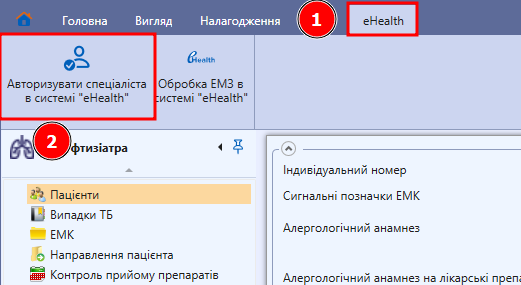
1. <span style="font-size: 11pt; font-family: Arial,sans-serif; color: #000000; background-color: transparent; font-weight: 400; font-style: normal; font-variant: normal; text-decoration: none; vertical-align: baseline; white-space: pre-wrap;">Натисніть на вкладку “eHealth” та на кнопку “Авторизувати спеціаліста в системі “eHealth””  
      
    </span>

[![image.png](https://knowledge.phc.org.ua/uploads/images/gallery/2024-12/scaled-1680-/fyQimage.png)](https://knowledge.phc.org.ua/uploads/images/gallery/2024-12/fyQimage.png)

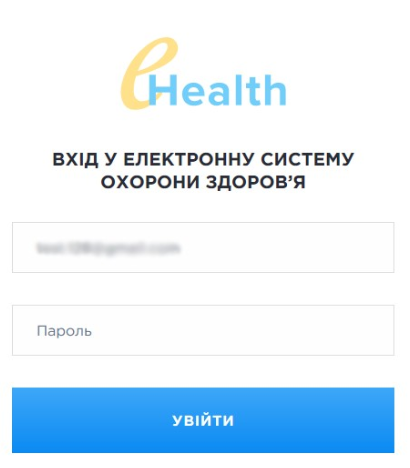
<span style="font-size: 11pt; font-family: Arial,sans-serif; color: #000000; background-color: transparent; font-weight: 400; font-style: normal; font-variant: normal; text-decoration: none; vertical-align: baseline; white-space: pre-wrap;">Внесіть пароль та натисніть кнопку “Увійти”  
  
</span>

[![image.png](https://knowledge.phc.org.ua/uploads/images/gallery/2024-12/scaled-1680-/GoKimage.png)](https://knowledge.phc.org.ua/uploads/images/gallery/2024-12/GoKimage.png)

<span style="font-size: 11pt; font-family: Arial,sans-serif; color: #000000; background-color: transparent; font-weight: 400; font-style: normal; font-variant: normal; text-decoration: none; vertical-align: baseline; white-space: pre-wrap;">Спробуйте знову виконати необхідну дію, наприклад, підписати направлення. Якщо помилка залишається, то перейдіть до пункту 2.  
  
</span>

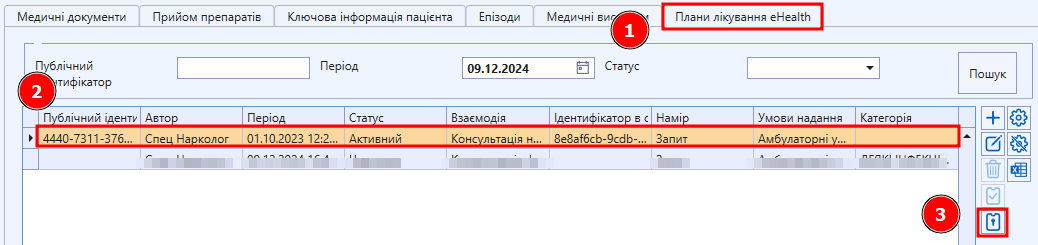
2. <span style="font-size: 11pt; font-family: Arial,sans-serif; color: #000000; background-color: transparent; font-weight: 400; font-style: normal; font-variant: normal; text-decoration: none; vertical-align: baseline; white-space: pre-wrap;">Натисніть на “План лікування”, оберіть свій план лікування, та натисніть на кнопку “Запросити доступ в “eHealth””  
    </span><span style="font-size: 11pt; font-family: Arial,sans-serif; color: #000000; background-color: transparent; font-weight: 400; font-style: normal; font-variant: normal; text-decoration: none; vertical-align: baseline; white-space: pre-wrap;">  
    </span><span style="font-size: 11pt; font-family: Arial,sans-serif; color: #000000; background-color: transparent; font-weight: bold; font-style: italic; font-variant: normal; text-decoration: none; vertical-align: baseline; white-space: pre-wrap;">Ваш план лікування - це план лікування у якого в полі “Автор” міститься ПІБ!</span>
    
    [![image.png](https://knowledge.phc.org.ua/uploads/images/gallery/2024-12/scaled-1680-/rikimage.png)](https://knowledge.phc.org.ua/uploads/images/gallery/2024-12/rikimage.png)

<span style="font-weight: normal;"><span style="font-size: 11pt; font-family: Arial, sans-serif; color: rgb(0, 0, 0); background-color: transparent; font-weight: 400; font-style: normal; font-variant: normal; white-space-collapse: preserve;"> Візміть доступ до плану лікування та повторіть дію при якій виникала помилка. </span></span>

# Як знайти направлення?

<span style="font-size: 12pt; font-family: 'Times New Roman',serif; color: #000000; background-color: transparent; font-weight: 400; font-style: normal; font-variant: normal; text-decoration: none; vertical-align: baseline; white-space: pre-wrap;">Направлення можна знайти 3 способами: </span>

### <span style="color: rgb(0, 0, 0);"><span style="font-size: 12pt; font-family: 'Times New Roman', serif; background-color: transparent; font-weight: bold; font-style: normal; font-variant: normal; text-decoration: none; vertical-align: baseline; white-space: pre-wrap;">В ЕМК пацієнта на вкладці “Епізоди”.</span><span style="font-size: 12pt; font-family: 'Times New Roman', serif; background-color: transparent; font-weight: 400; font-style: normal; font-variant: normal; text-decoration: none; vertical-align: baseline; white-space: pre-wrap;"> </span></span>

<span style="color: rgb(0, 0, 0);"><span style="font-size: 12pt; font-family: 'Times New Roman', serif; background-color: transparent; font-weight: 400; font-style: normal; font-variant: normal; text-decoration: none; vertical-align: baseline; white-space: pre-wrap;">Найбільш зручний спосіб, якщо Ви створювали епізод в ІС СЗХ.</span><span style="font-size: 12pt; font-family: 'Times New Roman', serif; background-color: transparent; font-weight: 400; font-style: normal; font-variant: normal; text-decoration: none; vertical-align: baseline; white-space: pre-wrap;">  
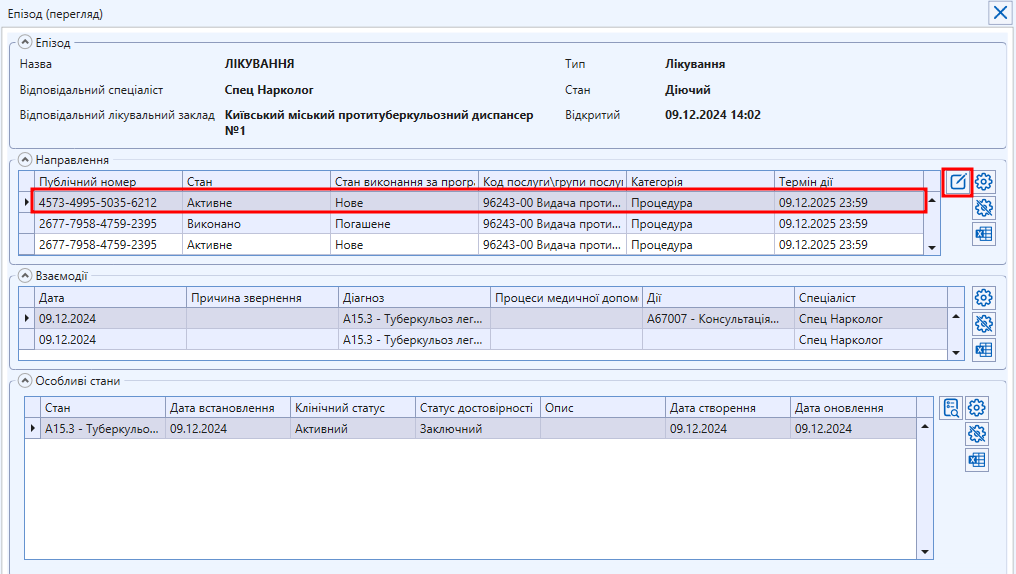
</span><span style="background-color: transparent; font-family: 'Times New Roman', serif; font-size: 12pt; font-style: normal; font-variant-ligatures: normal; font-variant-caps: normal; font-weight: 400; text-wrap: wrap;">З ЕМК пацієнта перейти на вкладку епізоди та знайти свій епізод (по назві чи заповненому полю “Остання дія в системі”. Натиснути кнопку “Редагувати”  
</span></span>

[![image.png](https://knowledge.phc.org.ua/uploads/images/gallery/2024-12/scaled-1680-/pbWimage.png)](https://knowledge.phc.org.ua/uploads/images/gallery/2024-12/pbWimage.png)

<span style="color: rgb(0, 0, 0);">**<span style="font-size: 12pt; font-family: 'Times New Roman', serif; background-color: transparent; font-weight: 400; font-style: normal; font-variant: normal; text-decoration: none; vertical-align: baseline; white-space: pre-wrap;">В картці епізода в частині “Направлення” є перелік всіх направлень, створених за цим епізодом. Потрібне направлення можна знайти за полем “Код послуги/групи послуг”. Щоб відкрити картку направлення, необхідно натиснути на нього, а потім на кнопку “Редагувати”.  
  
</span>**</span>[![image.png](https://knowledge.phc.org.ua/uploads/images/gallery/2024-12/scaled-1680-/AnIimage.png)](https://knowledge.phc.org.ua/uploads/images/gallery/2024-12/AnIimage.png)

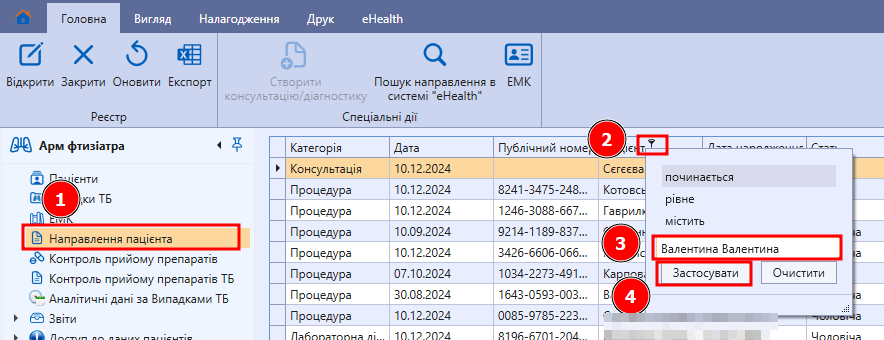
<span style="color: rgb(0, 0, 0);"><span style="font-size: 12pt; font-family: 'Times New Roman', serif; background-color: transparent; font-weight: bold; font-style: normal; font-variant: normal; text-decoration: none; vertical-align: baseline; white-space: pre-wrap;">В реєстрі “Направлення пацієнта” по ПІБ пацієнта</span><span style="font-size: 12pt; font-family: 'Times New Roman', serif; background-color: transparent; font-weight: 400; font-style: normal; font-variant: normal; text-decoration: none; vertical-align: baseline; white-space: pre-wrap;">.   
  
</span></span>

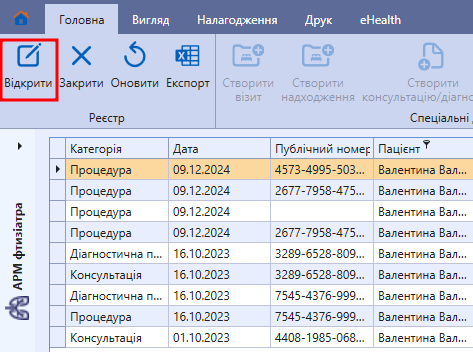
<span style="font-size: 12pt; font-family: 'Times New Roman',serif; color: #000000; background-color: transparent; font-weight: 400; font-style: normal; font-variant: normal; text-decoration: none; vertical-align: baseline; white-space: pre-wrap;"><span style="font-size: 12pt; font-family: 'Times New Roman', serif; background-color: transparent; font-weight: 400; font-style: normal; font-variant: normal; text-decoration: none; vertical-align: baseline; white-space: pre-wrap;">Перейти в реєстр "Направлення пацієнта", натиснути на фільтр, заповнити ПІБ пацієнта, натиснути “Застосувати”   
  
</span></span>![image.png](https://knowledge.phc.org.ua/uploads/images/gallery/2024-12/scaled-1680-/cmHimage.png)

<span style="font-size: 12pt; font-family: 'Times New Roman',serif; color: #000000; background-color: transparent; font-weight: 400; font-style: normal; font-variant: normal; text-decoration: none; vertical-align: baseline; white-space: pre-wrap;"><span style="font-size: 12pt; font-family: 'Times New Roman', serif; background-color: transparent; font-weight: 400; font-style: normal; font-variant: normal; text-decoration: none; vertical-align: baseline; white-space: pre-wrap;">Буде відображено перелік всіх направлень цього пацієнта. Необхідне направлення можна відкрити двічі натиснувши лівою кнопкою миші або через кнопку “Відкрити” </span></span>

[![image.png](https://knowledge.phc.org.ua/uploads/images/gallery/2024-12/scaled-1680-/RS2image.png)](https://knowledge.phc.org.ua/uploads/images/gallery/2024-12/RS2image.png)

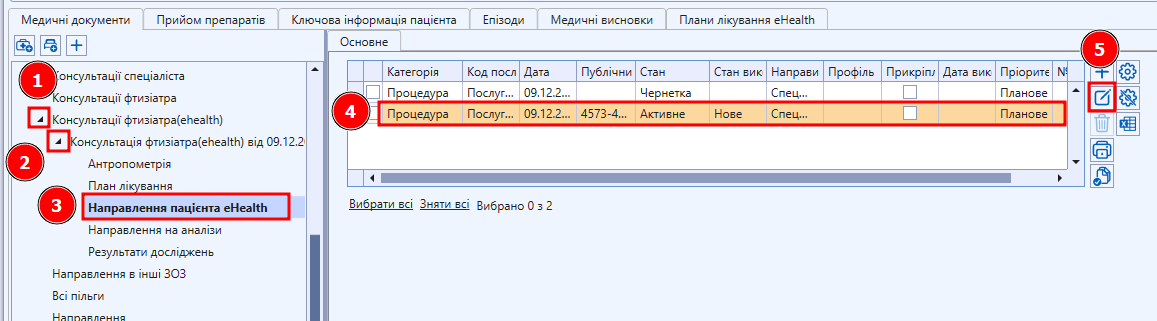
### <span style="color: rgb(0, 0, 0);">**<span style="font-size: 12pt; font-family: 'Times New Roman', serif; background-color: transparent; font-style: normal; font-variant: normal; text-decoration: none; vertical-align: baseline; white-space: pre-wrap;">В ЕМК пацієнта </span><span style="font-size: 12pt; font-family: 'Times New Roman', serif; background-color: transparent; font-style: normal; font-variant: normal; text-decoration: none; vertical-align: baseline; white-space: pre-wrap;">в пункті “</span><span style="font-size: 12pt; font-family: 'Times New Roman', serif; background-color: transparent; font-style: normal; font-variant: normal; text-decoration: none; vertical-align: baseline; white-space: pre-wrap;">Направлення пацієнта eHealth</span><span style="font-size: 12pt; font-family: 'Times New Roman', serif; background-color: transparent; font-style: normal; font-variant: normal; text-decoration: none; vertical-align: baseline; white-space: pre-wrap;"> в “</span><span style="font-size: 12pt; font-family: 'Times New Roman', serif; background-color: transparent; font-style: normal; font-variant: normal; text-decoration: none; vertical-align: baseline; white-space: pre-wrap;">Консультація (ehealth)”</span>**</span>

<span style="color: rgb(0, 0, 0);"><span style="font-size: 12pt; font-family: 'Times New Roman', serif; background-color: transparent; font-weight: 400; font-style: normal; font-variant: normal; text-decoration: none; vertical-align: baseline; white-space: pre-wrap;">Даний спосіб буде зручним, якщо направлення були створені в останній консультації.  
  
</span><span style="font-size: 12pt; font-family: 'Times New Roman', serif; background-color: transparent; font-weight: 400; font-style: normal; font-variant: normal; text-decoration: none; vertical-align: baseline; white-space: pre-wrap;">В ЕМК знайти “Консультації (ehealth)”, відкрити пункти, відкрити пункти консультації, натиснути на “Направлення пацієнта eHealth”, обрати необхідне направленні і натиснути "Редагувати"</span></span>

[![image.png](https://knowledge.phc.org.ua/uploads/images/gallery/2024-12/scaled-1680-/axgimage.png)](https://knowledge.phc.org.ua/uploads/images/gallery/2024-12/axgimage.png)

# Помилка “Access denied”

<span lang="UK" style="font-size: 14.0pt; line-height: 115%; font-family: 'Times New Roman',serif; mso-fareast-font-family: 'Times New Roman'; mso-ansi-language: UK;">Якщо виникла помилка “Access denied”, то необхідно отримати **доступ на План лікування** від пацієнта:</span>

***<span lang="UK" style="font-size: 14.0pt; line-height: 115%; font-family: 'Times New Roman',serif; mso-fareast-font-family: 'Times New Roman'; mso-ansi-language: UK; mso-no-proof: yes;">[![28.png](https://knowledge.phc.org.ua/uploads/images/gallery/2024-04/scaled-1680-/28.png)](https://knowledge.phc.org.ua/uploads/images/gallery/2024-04/28.png)  
</span>***

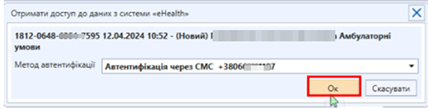
<span lang="UK" style="font-size: 14.0pt; line-height: 115%; font-family: 'Times New Roman',serif; mso-fareast-font-family: 'Times New Roman'; mso-ansi-language: UK;">У формі **Отримати дозвіл на читання даних з системи «eHealth»** необхідно вказати активний метод автентифікації і натиснути **\[Ок\]:**</span>

**<span lang="UK" style="font-size: 14.0pt; line-height: 115%; font-family: 'Times New Roman',serif; mso-fareast-font-family: 'Times New Roman'; mso-ansi-language: UK; mso-no-proof: yes;">[![29.png](https://knowledge.phc.org.ua/uploads/images/gallery/2024-04/scaled-1680-/29.png)](https://knowledge.phc.org.ua/uploads/images/gallery/2024-04/29.png)  
</span>**

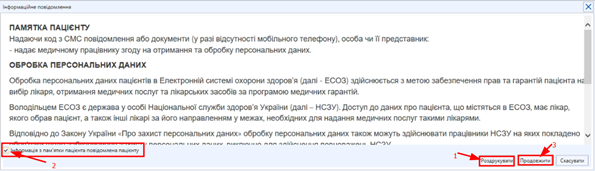
<span lang="UK" style="font-size: 14.0pt; line-height: 115%; font-family: 'Times New Roman',serif; mso-fareast-font-family: 'Times New Roman'; mso-ansi-language: UK;">З’являється пам’ятка на отримання та обробку персональних даних пацієнта</span>

***<span lang="UK" style="font-size: 14.0pt; line-height: 115%; font-family: 'Times New Roman',serif; mso-fareast-font-family: 'Times New Roman'; mso-ansi-language: UK; mso-no-proof: yes;">[![30.png](https://knowledge.phc.org.ua/uploads/images/gallery/2024-04/scaled-1680-/30.png)](https://knowledge.phc.org.ua/uploads/images/gallery/2024-04/30.png)  
</span>***

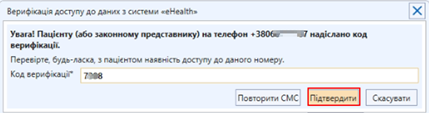
<span lang="UK" style="font-size: 14.0pt; line-height: 115%; font-family: 'Times New Roman',serif; mso-fareast-font-family: 'Times New Roman'; mso-ansi-language: UK;">Пацієнт надає **код верифікації**, далі натискаємо кнопку **\[Підтвердити\]**</span>

**<span lang="UK" style="font-size: 14.0pt; line-height: 115%; font-family: 'Times New Roman',serif; mso-fareast-font-family: 'Times New Roman'; mso-ansi-language: UK; mso-no-proof: yes;">[![31.png](https://knowledge.phc.org.ua/uploads/images/gallery/2024-04/scaled-1680-/31.png)](https://knowledge.phc.org.ua/uploads/images/gallery/2024-04/31.png)  
</span>**

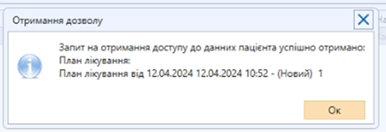
**<span lang="UK" style="font-size: 14.0pt; line-height: 115%; font-family: 'Times New Roman',serif; mso-fareast-font-family: 'Times New Roman'; mso-ansi-language: UK;">Після отримання даного повідомлення можна виконувати дії з планом лікування як зазвичай:</span>*<span lang="UK" style="font-size: 14.0pt; line-height: 115%; font-family: 'Times New Roman',serif; mso-fareast-font-family: 'Times New Roman'; mso-ansi-language: UK; mso-no-proof: yes;">[![32.png](https://knowledge.phc.org.ua/uploads/images/gallery/2024-04/scaled-1680-/32.png)](https://knowledge.phc.org.ua/uploads/images/gallery/2024-04/32.png)</span>***