# Наступний візит до сімейного лікаря, продовження плану лікування

<span lang="UK" style="font-size: 14.0pt; line-height: 115%; font-family: 'Times New Roman',serif; mso-fareast-font-family: 'Times New Roman'; mso-ansi-language: UK;">При наступному візиті пацієнта **НЕ потрібно створювати новий Епізод,** а також новий **План лікування**!</span>

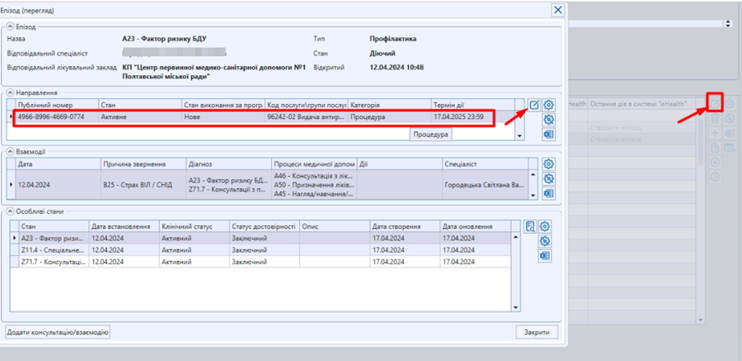
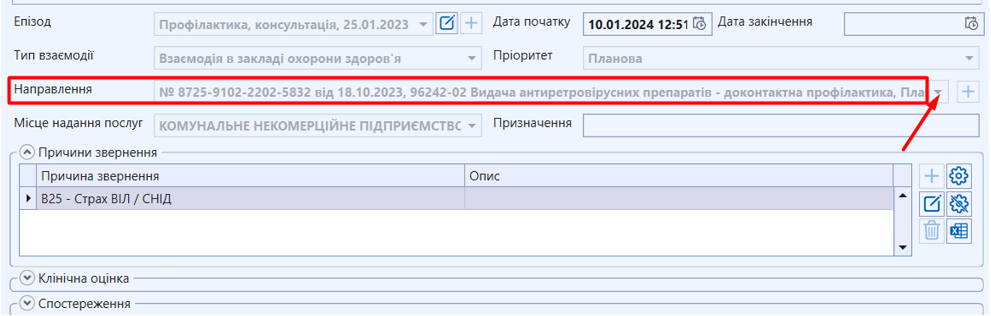
<span lang="UK" style="font-size: 14.0pt; line-height: 115%; font-family: 'Times New Roman',serif; mso-fareast-font-family: 'Times New Roman'; mso-ansi-language: UK;">**Варіант 1.** Знайдіть та відкрийте **Епізод**. Оберіть **нове** електронне направлення</span>

<span lang="ru" style="mso-no-proof: yes;">[![42.png](https://knowledge.phc.org.ua/uploads/images/gallery/2024-04/scaled-1680-/42.png)](https://knowledge.phc.org.ua/uploads/images/gallery/2024-04/42.png)  
</span>

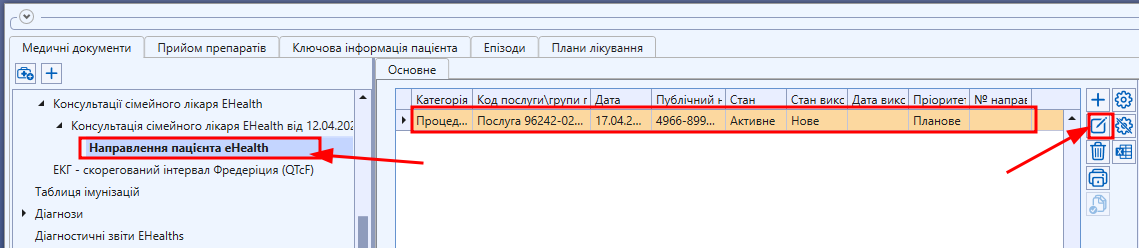
**<span lang="UK" style="font-size: 14.0pt; line-height: 115%; font-family: 'Times New Roman',serif; mso-fareast-font-family: 'Times New Roman'; mso-ansi-language: UK;">Варіант 2.</span>**<span lang="UK" style="font-size: 14.0pt; line-height: 115%; font-family: 'Times New Roman',serif; mso-fareast-font-family: 'Times New Roman'; mso-ansi-language: UK;"> Знайти **Нове** електронне направлення в попедній консультації сімейного лікаря</span>

<span lang="ru" style="mso-no-proof: yes;">[![48.png](https://knowledge.phc.org.ua/uploads/images/gallery/2024-04/scaled-1680-/48.png)](https://knowledge.phc.org.ua/uploads/images/gallery/2024-04/48.png)  
</span>

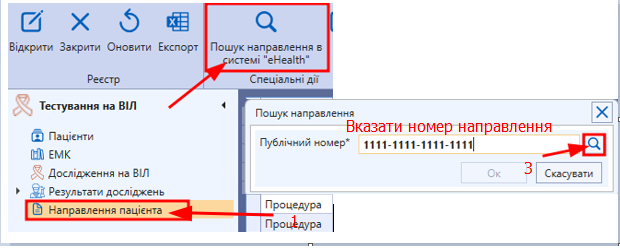
**<span lang="UK" style="font-size: 14.0pt; line-height: 115%; font-family: 'Times New Roman',serif; mso-fareast-font-family: 'Times New Roman'; mso-ansi-language: UK;">Варіант 3. </span>**<span lang="UK" style="font-size: 14.0pt; line-height: 115%; font-family: 'Times New Roman',serif; mso-fareast-font-family: 'Times New Roman'; mso-ansi-language: UK;">Знайти **Н**</span><span lang="UK" style="font-size: 14.0pt; line-height: 115%; font-family: 'Times New Roman',serif; mso-fareast-font-family: 'Times New Roman'; mso-ansi-language: UK;">**ове** електронне направлення через реєстр **«**Направлення пацієнта**»**</span>

**<span lang="UK" style="font-size: 14.0pt; line-height: 115%; font-family: 'Times New Roman',serif; mso-fareast-font-family: 'Times New Roman'; mso-ansi-language: UK;">[![49.png](https://knowledge.phc.org.ua/uploads/images/gallery/2024-04/scaled-1680-/49.png)](https://knowledge.phc.org.ua/uploads/images/gallery/2024-04/49.png)</span>**

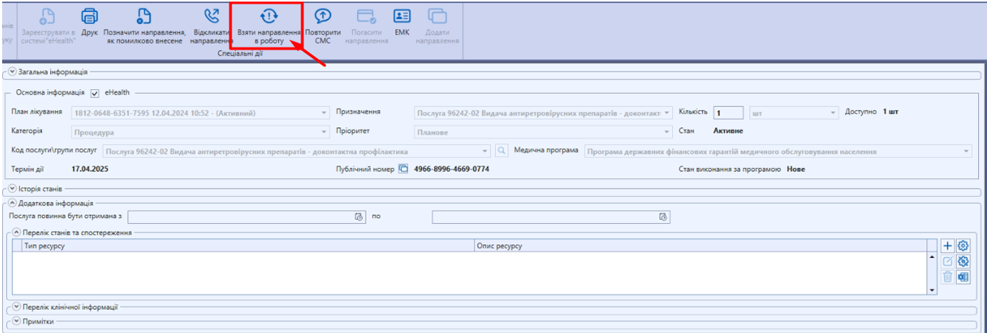
<span lang="UK" style="font-size: 14.0pt; line-height: 115%; font-family: 'Times New Roman',serif; mso-fareast-font-family: 'Times New Roman'; mso-ansi-language: UK;">Далі необхідно взяти направлення в роботу (автоматично підтягнеться прізвище лікаря і місце надання послуг) та підписати **ЕЦП.** Створене направлення буде **«В обробці»**</span>

<span lang="UK" style="font-size: 14.0pt; line-height: 115%; font-family: 'Times New Roman',serif; mso-fareast-font-family: 'Times New Roman'; mso-ansi-language: UK; mso-no-proof: yes;">[![43.png](https://knowledge.phc.org.ua/uploads/images/gallery/2024-04/scaled-1680-/43.png)](https://knowledge.phc.org.ua/uploads/images/gallery/2024-04/43.png)  
</span>

<span lang="UK" style="font-size: 14.0pt; line-height: 115%; font-family: 'Times New Roman',serif; mso-fareast-font-family: 'Times New Roman'; mso-ansi-language: UK;">Створити **Консультацію сімейного лікаря eHealth**, обрати направлення з випадаючого списку, яке взято в роботу. Вказати дії, які були проведені під час консультації</span>

<span lang="UK" style="font-size: 14.0pt; line-height: 115%; font-family: 'Times New Roman',serif; mso-fareast-font-family: 'Times New Roman'; mso-ansi-language: UK; mso-no-proof: yes;">[![44.png](https://knowledge.phc.org.ua/uploads/images/gallery/2024-04/scaled-1680-/44.png)](https://knowledge.phc.org.ua/uploads/images/gallery/2024-04/44.png)  
</span>

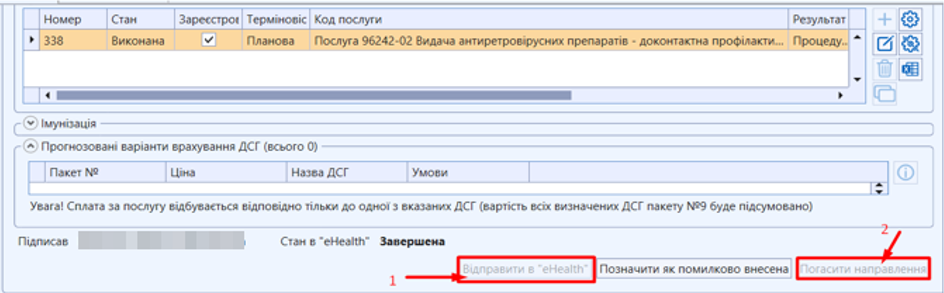
<span lang="UK" style="font-size: 14.0pt; line-height: 115%; font-family: 'Times New Roman',serif; mso-fareast-font-family: 'Times New Roman'; mso-ansi-language: UK;"> </span><span lang="UK" style="font-size: 14.0pt; line-height: 115%; font-family: 'Times New Roman',serif; mso-fareast-font-family: 'Times New Roman'; mso-ansi-language: UK;">Натиснути **\[Відправити в eHealth\] (1),** підписати **ЕЦП** та **Погасити направлення (2)**</span>

<span lang="ru" style="mso-no-proof: yes;">[![45.png](https://knowledge.phc.org.ua/uploads/images/gallery/2024-04/scaled-1680-/45.png)](https://knowledge.phc.org.ua/uploads/images/gallery/2024-04/45.png)  
</span>

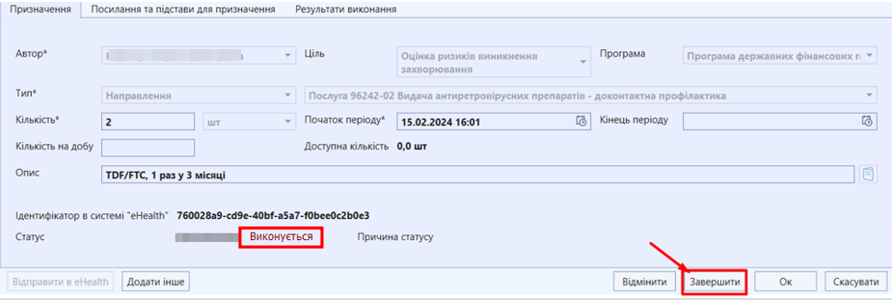
**<span lang="UK" style="font-size: 14.0pt; line-height: 115%; font-family: 'Times New Roman',serif; mso-fareast-font-family: 'Times New Roman'; mso-ansi-language: UK;"> </span><span lang="UK" style="font-size: 14.0pt; line-height: 115%; font-family: 'Times New Roman',serif; mso-fareast-font-family: 'Times New Roman'; color: red; mso-ansi-language: UK;">УВАГА!</span>**<span lang="UK" style="font-size: 14.0pt; line-height: 115%; font-family: 'Times New Roman',serif; mso-fareast-font-family: 'Times New Roman'; mso-ansi-language: UK;"> Лише після того, як були використані всі доступні взаємодії, поточне **Призначення** потрібно завершити та створити нове</span>

<span lang="ru" style="mso-no-proof: yes;">[![46.png](https://knowledge.phc.org.ua/uploads/images/gallery/2024-04/scaled-1680-/46.png)](https://knowledge.phc.org.ua/uploads/images/gallery/2024-04/46.png)  
</span>

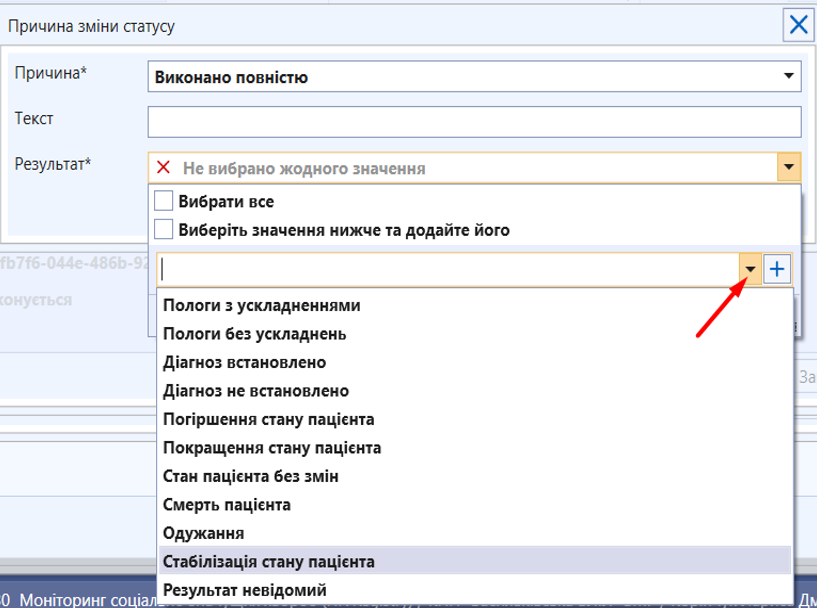
<span lang="UK" style="font-size: 14.0pt; line-height: 115%; font-family: 'Times New Roman',serif; mso-fareast-font-family: 'Times New Roman'; mso-ansi-language: UK;">У вікні, що відкрилося натиснути на кнопку **\[Завершити\]**:</span>

<span lang="ru" style="mso-no-proof: yes;">[![47.png](https://knowledge.phc.org.ua/uploads/images/gallery/2024-04/scaled-1680-/47.png)](https://knowledge.phc.org.ua/uploads/images/gallery/2024-04/47.png)  
</span>

<span lang="UK" style="font-size: 14.0pt; line-height: 115%; font-family: 'Times New Roman',serif; mso-fareast-font-family: 'Times New Roman'; mso-ansi-language: UK;"> </span><span lang="UK" style="font-size: 14.0pt; line-height: 115%; font-family: 'Times New Roman',serif; mso-fareast-font-family: 'Times New Roman'; mso-ansi-language: UK; mso-no-proof: yes;">[![50.png](https://knowledge.phc.org.ua/uploads/images/gallery/2024-04/scaled-1680-/50.png)](https://knowledge.phc.org.ua/uploads/images/gallery/2024-04/50.png)  
</span>

<span lang="UK" style="font-size: 14.0pt; line-height: 115%; font-family: 'Times New Roman',serif; mso-fareast-font-family: 'Times New Roman'; mso-ansi-language: UK; mso-no-proof: yes;">[![51.png](https://knowledge.phc.org.ua/uploads/images/gallery/2024-04/scaled-1680-/51.png)](https://knowledge.phc.org.ua/uploads/images/gallery/2024-04/51.png)  
</span>

<span lang="UK" style="font-size: 14.0pt; line-height: 115%; font-family: 'Times New Roman',serif; mso-fareast-font-family: 'Times New Roman'; mso-ansi-language: UK; mso-no-proof: yes;">[![52.png](https://knowledge.phc.org.ua/uploads/images/gallery/2024-04/scaled-1680-/52.png)](https://knowledge.phc.org.ua/uploads/images/gallery/2024-04/52.png)  
</span>

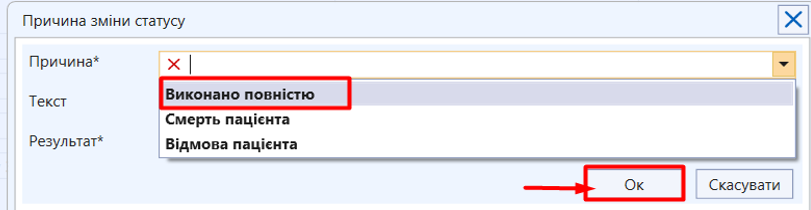
<span lang="UK" style="font-size: 14.0pt; line-height: 115%; font-family: 'Times New Roman',serif; mso-fareast-font-family: 'Times New Roman'; mso-ansi-language: UK;">Після заповнення полів натиснути **\[ОК\]**. Після цього Статус зміниться на **«Виконано»**</span><span lang="ru" style="mso-no-proof: yes;"></span><span lang="UK" style="font-size: 14.0pt; line-height: 115%; font-family: 'Times New Roman',serif; mso-fareast-font-family: 'Times New Roman'; mso-ansi-language: UK;">[![1.png](https://knowledge.phc.org.ua/uploads/images/gallery/2024-04/scaled-1680-/YQX1.png)](https://knowledge.phc.org.ua/uploads/images/gallery/2024-04/YQX1.png)</span>

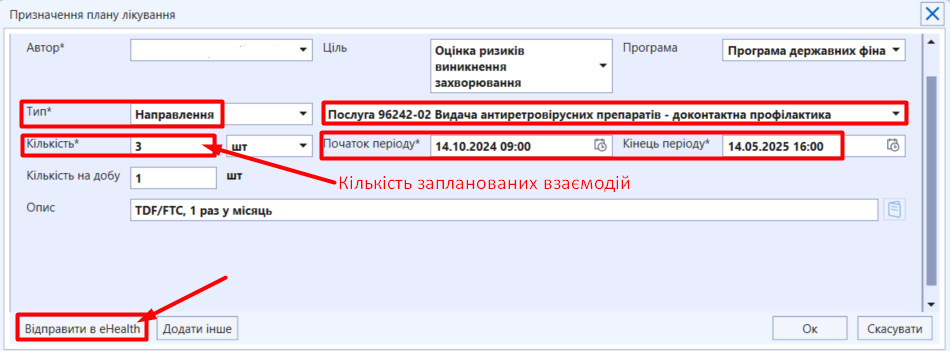
<span lang="UK" style="font-size: 14.0pt; line-height: 115%; font-family: 'Times New Roman',serif; mso-fareast-font-family: 'Times New Roman'; mso-ansi-language: UK;">Далі потрібно створити **нове призначення** з потрібною кількістю взаємодій</span>

<span lang="ru" style="mso-no-proof: yes;">[![2.png](https://knowledge.phc.org.ua/uploads/images/gallery/2024-04/scaled-1680-/Lm12.png)](https://knowledge.phc.org.ua/uploads/images/gallery/2024-04/Lm12.png)  
</span>

<span lang="UK" style="font-size: 10.0pt; line-height: 115%; font-family: 'Times New Roman',serif; mso-fareast-font-family: 'Times New Roman'; mso-ansi-language: UK;"> </span><span lang="UK" style="font-size: 14.0pt; line-height: 115%; font-family: 'Times New Roman',serif; mso-fareast-font-family: 'Times New Roman'; mso-ansi-language: UK;">У вікні, що відкриється заповнити інформацію відповідно до зразка і натиснути **\[Відправити в <span style="font-size: 14.0pt; line-height: 107%; font-family: 'Times New Roman',serif; mso-fareast-font-family: 'Times New Roman'; mso-ansi-language: UK; mso-fareast-language: EN-US; mso-bidi-language: AR-SA;">eHealth</span>\]:**</span>

<span lang="ru" style="mso-no-proof: yes;">[![3.png](https://knowledge.phc.org.ua/uploads/images/gallery/2024-12/scaled-1680-/3.png)](https://knowledge.phc.org.ua/uploads/images/gallery/2024-12/3.png)  
</span>

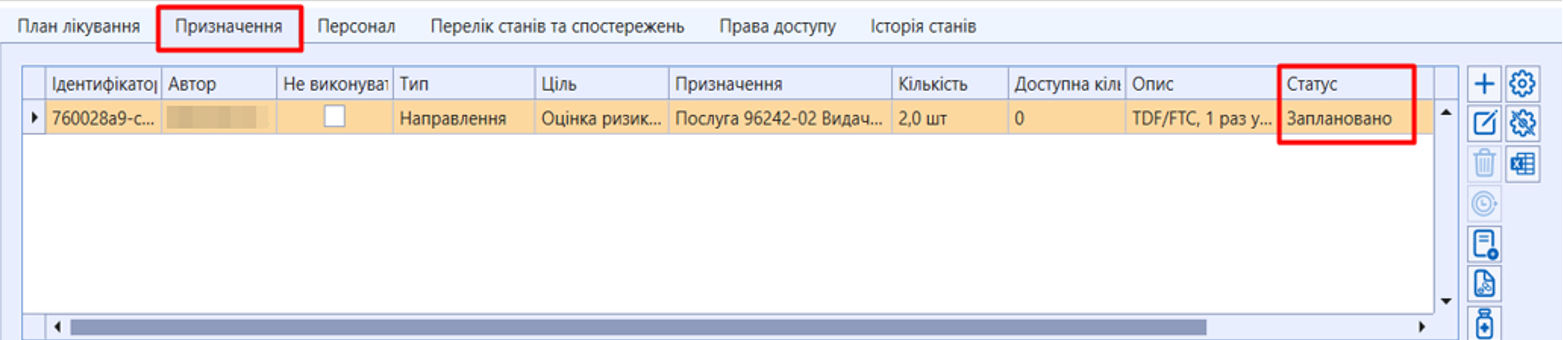
<span lang="UK" style="font-size: 10.0pt; line-height: 115%; font-family: 'Times New Roman',serif; mso-fareast-font-family: 'Times New Roman'; mso-ansi-language: UK;"> </span><span lang="UK" style="font-size: 14.0pt; line-height: 115%; font-family: 'Times New Roman',serif; mso-fareast-font-family: 'Times New Roman'; mso-ansi-language: UK;">Статус **«Проект»** буде змінено на **«Заплановано»**</span>

<span lang="ru" style="mso-no-proof: yes;">[![4.png](https://knowledge.phc.org.ua/uploads/images/gallery/2024-04/scaled-1680-/Vdr4.png)](https://knowledge.phc.org.ua/uploads/images/gallery/2024-04/Vdr4.png)  
</span>