# Створення консультації eHealth

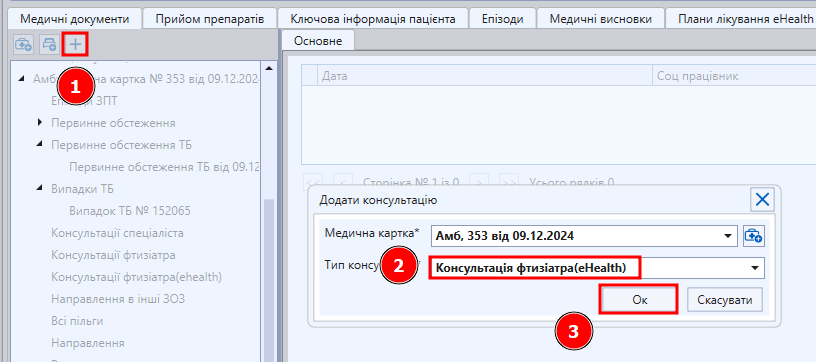
<span lang="ru" style="font-size: 14.0pt; line-height: 115%; font-family: 'Times New Roman',serif; mso-fareast-font-family: 'Times New Roman';">Для створення консультації eHealth потрібно натиснути "Додати консультацію" та обрати “Консультація фтизіатра eHealth”.</span>

[![image.png](https://knowledge.phc.org.ua/uploads/images/gallery/2024-12/scaled-1680-/j87image.png)](https://knowledge.phc.org.ua/uploads/images/gallery/2024-12/j87image.png)

<span lang="ru" style="font-size: 14.0pt; line-height: 115%; font-family: 'Times New Roman',serif; mso-fareast-font-family: 'Times New Roman';">Заповнити такі поля: “Випадок обслуговування”, “Епізод”, “Тип взаємодії”, “Пріоритет”, “Місце надання послуг”.</span>

[![image.png](https://knowledge.phc.org.ua/uploads/images/gallery/2024-12/scaled-1680-/wItimage.png)](https://knowledge.phc.org.ua/uploads/images/gallery/2024-12/wItimage.png)

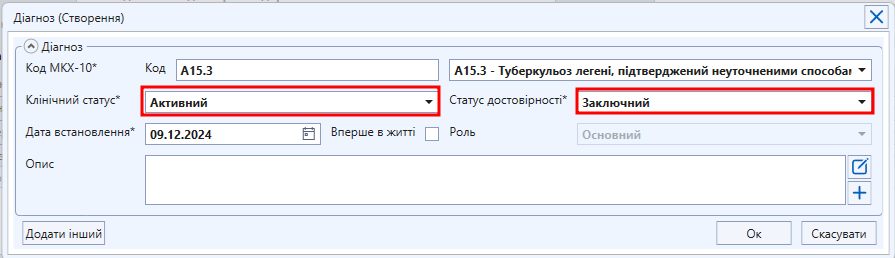
<span lang="ru" style="font-size: 14.0pt; line-height: 115%; font-family: 'Times New Roman',serif; mso-fareast-font-family: 'Times New Roman';"> </span><span lang="ru" style="font-size: 14.0pt; line-height: 115%; font-family: 'Times New Roman',serif; mso-fareast-font-family: 'Times New Roman';">Додати діагноз, Клінічний статус = "Активний", Статус достовірності = "Заключний".</span>

[![image.png](https://knowledge.phc.org.ua/uploads/images/gallery/2024-12/scaled-1680-/NI7image.png)](https://knowledge.phc.org.ua/uploads/images/gallery/2024-12/NI7image.png)

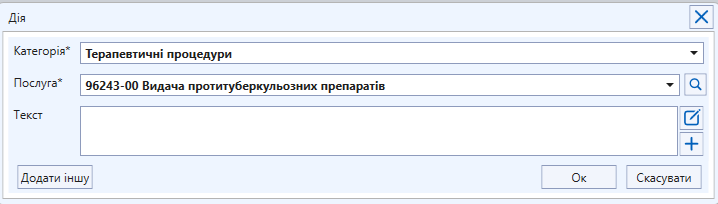
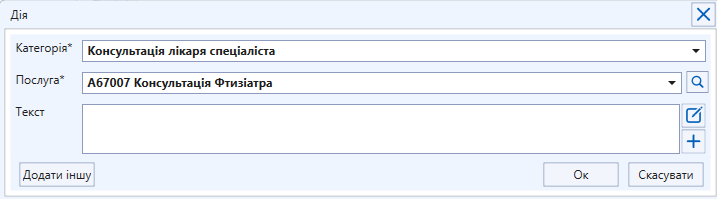
<span lang="ru" style="font-size: 14.0pt; line-height: 115%; font-family: 'Times New Roman',serif; mso-fareast-font-family: 'Times New Roman';">Обрати дії, які були надані під час консультації. </span>

[![image.png](https://knowledge.phc.org.ua/uploads/images/gallery/2024-12/scaled-1680-/NsPimage.png)](https://knowledge.phc.org.ua/uploads/images/gallery/2024-12/NsPimage.png)

[![image.png](https://knowledge.phc.org.ua/uploads/images/gallery/2024-12/scaled-1680-/CQ5image.png)](https://knowledge.phc.org.ua/uploads/images/gallery/2024-12/CQ5image.png)
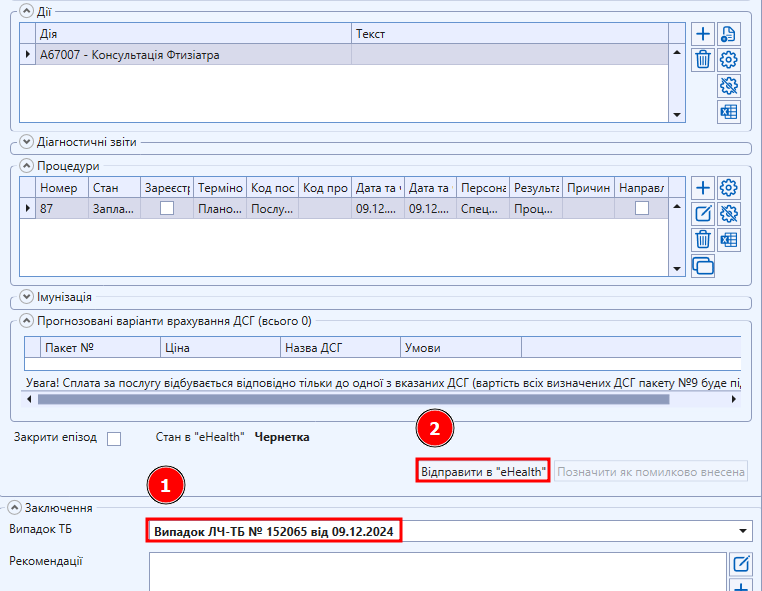
<span lang="ru" style="font-size: 14.0pt; line-height: 115%; font-family: 'Times New Roman',serif; mso-fareast-font-family: 'Times New Roman';">Заповнити поле “Випадок ТБ” та натиснути "Відправити в eHealth".</span>

[![image.png](https://knowledge.phc.org.ua/uploads/images/gallery/2024-12/scaled-1680-/Vgjimage.png)](https://knowledge.phc.org.ua/uploads/images/gallery/2024-12/Vgjimage.png)

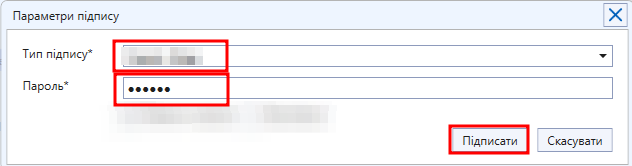
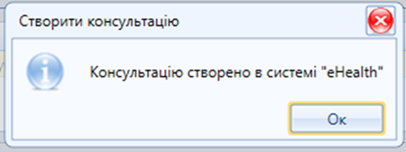
<span lang="ru" style="font-size: 14.0pt; line-height: 115%; font-family: 'Times New Roman',serif; mso-fareast-font-family: 'Times New Roman';">З’явиться картка для підписання ЕЦП. Необхідно обрати ключ, ввести пароль ключа та натиснути "Підписати".</span>

[![image.png](https://knowledge.phc.org.ua/uploads/images/gallery/2024-12/scaled-1680-/yqVimage.png)](https://knowledge.phc.org.ua/uploads/images/gallery/2024-12/yqVimage.png)

<span lang="ru" style="font-size: 14.0pt; line-height: 115%; font-family: 'Times New Roman',serif; mso-fareast-font-family: 'Times New Roman'; mso-no-proof: yes;">  
</span>

<span lang="ru" style="font-size: 14.0pt; line-height: 115%; font-family: 'Times New Roman',serif; mso-fareast-font-family: 'Times New Roman'; mso-no-proof: yes;">[![Рисунок18.png](https://knowledge.phc.org.ua/uploads/images/gallery/2022-10/scaled-1680-/risunok18.png)](https://knowledge.phc.org.ua/uploads/images/gallery/2022-10/risunok18.png)  
</span>

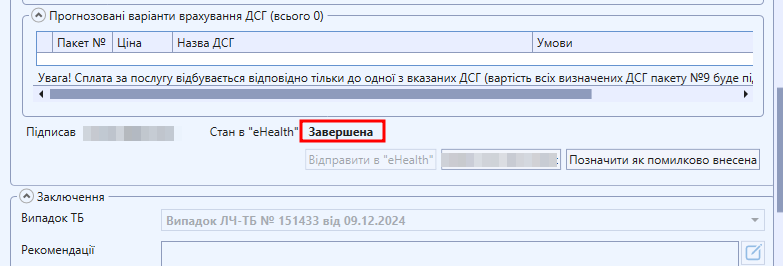
<span lang="ru" style="font-size: 14.0pt; line-height: 115%; font-family: 'Times New Roman',serif; mso-fareast-font-family: 'Times New Roman';">Дочекатися поки статус консультації в системі eHealth зміниться на<span style="mso-spacerun: yes;"> </span>“Завершена”.  
  
</span>[![image.png](https://knowledge.phc.org.ua/uploads/images/gallery/2024-12/scaled-1680-/Zvrimage.png)](https://knowledge.phc.org.ua/uploads/images/gallery/2024-12/Zvrimage.png)

<span lang="ru" style="font-size: 14.0pt; line-height: 115%; font-family: 'Times New Roman',serif; mso-fareast-font-family: 'Times New Roman';">У випадку, якщо були зроблені <span style="color: rgb(224, 62, 45);">**помилки**</span>, є можливість позначити консультацію помилково внесеною. Для цього необхідно натиснути кнопку **<span style="color: rgb(224, 62, 45);">“Позначити як помилково внесена”</span>**, заповнити поля та "Ок".</span>

[![image.png](https://knowledge.phc.org.ua/uploads/images/gallery/2024-12/scaled-1680-/SVoimage.png)](https://knowledge.phc.org.ua/uploads/images/gallery/2024-12/SVoimage.png)

<span lang="ru" style="font-size: 14.0pt; line-height: 115%; font-family: 'Times New Roman',serif; mso-fareast-font-family: 'Times New Roman';">  
</span><span lang="ru" style="font-size: 14.0pt; line-height: 115%; font-family: 'Times New Roman',serif; mso-fareast-font-family: 'Times New Roman';"></span>